Mac下完美的视频播放器MPlayer OSX Extended for Mac下载

个人觉得这个在Mac下已经非常完美的播放器了,属性设置里可以设置窗口总在最前,虽然没有XP下的Kmplayer舒服,但是Mac下没得选了.呵呵.支持格式很丰富.播放不了的就忍忍吧.哇哦.这个算是Mplayer OSX的扩展版,增强型.
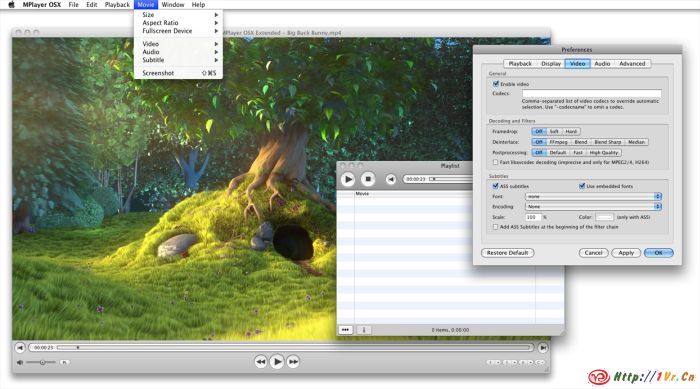
This is an unofficial extended version of the MPlayer OSX GUI.

While MPlayer is the superior media player for OSX and has a very nice GUI, it was lacking in access to the many powerful functions the backend provides and development hasn’t been very fast.
Since I had some time on my hands I decided to learn Cocoa and improve the MPlayer OSX GUI.

In the process, I also figured out how to compile a redistributable version of the mplayer core and provide a recent build from the SVN.

Changes to the GUI include:
More video filter options (Postprocessing, Deinterlace etc)
Support for styled ASS subtitles
Audio and video equalizers (not yet interactive)
Taking Screenshots
Stream selection
Various interface improvements

官网:http://mplayerosx.sttz.ch
下载地址:MPlayer OSX Extended – Revision 7 (14.4MB, 20. October 2008)
http://mplayerosx.sttz.ch/downloads/MPlayer-OSX-Extended_rev7.dmg
汉化补丁:点击下载此文件
来干掉QQ的广告吧!QQShell V2.0.0.1212

QQ好友列表突然花了,重装了显卡驱动,重装了QQ都没办法.很疑惑.凑活用吧.闹腾!

查找最新的去广告补丁等信息,发现了不好新闻哦.什么彩虹显IP,什么51.Com,好乱.使劲的咬吧,谁把谁咬死都行.

我找显IP并不是钟情于看别人在哪,不是很关心这个,早已没有寻觅对方所在地的乐趣,想当初一说你在哪哪哪呢吧?对方会很诧异的问,你怎么知道.如今早已没了神秘感.我最关心的是去广告.QQ的广告无处不在,很是烦恼.不是一般的烦恼.虽说免费的,但是广告也要放的厚道点吧.

给大家推荐我今天新发现的QQShell,腾讯不开放API,微软开放了Msn的API,大家可以随意丰富Msn的东西,不知道腾讯怎么想的,互赢互利的事为什么不做?!

一、适用:XP SP2,XP SP3系统(其它系统无条件测试未知可否)、QQ2008所有版本、QQ2009 Preview。
二、功能:
1、去除聊天窗口的广告,禁止QQ广告下载;
2、屏蔽QQ秀链接和对方店铺信息(2008正式版可用);
3、去除“交谈中请勿轻信汇款…”等警示语;
  4、去除查找/添加好友窗口广告;
  5、去除腾讯网迷你首页;
  6、去除系统消息、温馨提示等10000号窗口;
  7、去除腾讯QQ弹出广告;
8、去除腾讯其它弹出窗口;
  9、去除QQ新闻窗口;
10、摘除彩虹QQ帽子;
11、拦截自定义网页;
12、自定义热键设置;
13、程序启动是否自动隐藏设置;
14、程序在QQ退出后是否自动退出设置;
15、支持快登功能,适合群登用户。
16、拦截QQ2009迷你首页、卡片广告(新闻)窗口。
三、使用:
1、拦截弹出广告窗口的前提是先运行本程序后上QQ;
2、程序启动时如自动隐藏,Ctrl+Alt+P默认热键调出设置窗口;
    3、默认启动为QQ路径;如要启动外挂,可将QQShell.ini文件中的0001=””改成你的外挂(如FinePlus)的路径即可;
4、使用群登时,可将登录的路径改为本程序的路径。
三、注意事项:
1、本软件只供学习交流用,请在下载后24小时内删除;
2、QQ2009不支持快登功能。

最新更新:
2008年12月12日
针对TX对卡片窗口的不断变化而加强删除卡片窗口功能

QQShell:点击下载此文件
然后再下载一个优化工具去清理一下QQ安装目录下的垃圾文件,很不错.在这里下载:
威雅[ViYa]QQ精简瘦身工具,做属于自己的QQ,适用所有版本
http://www.viyazone.cn/post/1524

Unity3D for Iphone版升级到1.0.1啦!

转一下Unity3D官网的更新日志:

Unity iPhone 1.0.1
Whether on an iPhone or an iPod Touch, you will be able to dazzle your audience with the finest content available in the App Store. 2D or 3D, touch or tilt — if you can think it, you will be able to build it.

Increased Performance
From changes to the default settings to the addition of iPhone script call optimization, this release is focused on helping to ensure that your games continue to redefine what gamers expect to find on a phone.

Improved Live Preview
Improvements to the reliability of UnityRemote ensure that all touch phases and accelerator changes are registered while viewing and testing your game inside the Unity Editor.

Compressed Audio
With mp3/m4a compressed audio playback, you can include longer playing audio files in your games without compromising your distribution size.

Additional Features, improvements, and changes
New Features and Improvements
Added support for compressed mp3/m4a audio playback. Note that iPhone hardware supports only one compressed audio clip at a time
Improved performance of script to engine calls by an order of magnitude (e.g calling transform.localPosition is 300% faster). This optimization is disabled by default and should be enabled via Project Settings | Player | iPhone script call optimization property. Note that exception handling will not work correctly when this optimization is enabled
Improved Mono runtime stability
Improved gathering of referenced assemblies while building player
OnApplicationQuit() callback gets called while quiting Unity player
OnApplicationPause() callback gets called once Unity player becomes inactive
Added support for Application.OpenURL
Exposed UnityPause() function to ObjectiveC for better interoperability between custom code and Unity player
Status bar is now hidden on startup
Introduced support for explicitly defined bounding volume areas for occlusion culling
Improved occlusion culling volume generation
Made input in UnityRemote more reliable. All touch phases and accelerator changes are guaranteed to reach the Editor
Improved UnityRemote connectivity by exchanging echo packets with Editor to ensure that connection is valid
Improved internal profiler statistics with various aspects of engine performance being displayed
Internal profiler statististcs are disabled by default for better performance
kFPS set to 60 by default to provide stable frame-rate
Bug Fixes
Fixed PlayerPrefs bug preventing it to store persistent data
Fixed memory leak when loading scenes
Fixed Horizontal/Vertical slider crash
Fixed occasional crash during Mono garbage collection
Fixed crash in AOT cross compilation which subsequently left process hanging on in the background
Fixed number of bytecode stripping bugs
Fixed grahics related crash
Worked around OpenAL bug which caused audio clips sometimes to stop playing
Fixed trail and line renderers
Fixed issue where WWW class preventing data to be sent immediately on 3G/Edge
Fixed issue with transparent sorting
Fixed default GUI skin failing to pass build step verification
Fixed split screen support in the Editor
Fixed AudioSource playback to respect AudioListener volume
Fixed assert when skinned characters come into view
Fixed Screen.width/height briefly reporting wrong values in the Editor
Fixed bug where installer pops up old version warning

雕模软件Zbrush 3.12 for Mac 下载

Zbrush 3.12 for Mac版,免激活版,装好后即可使用.

Zbrush3.0共耗时3年,有多项功能改进和增加。
提高zbrush的速度;
增加实时阴影、实时材质捕捉和渲染;
使用阿尔法和纹理全三维雕刻;
高级的“数字黏土”使用HD多边形可以将多边形数量提升到10亿个;
使用zb的变形函数可以实时调节pose;
透视相机;
2D / 2.5D /3D网格投影;
网格重新布线;
基于网格拓扑结构/空洞/颜色的遮罩;
一键纪录和quicktime输出;
支持32/64位炒作系统;
支持多处理器数提高到256个;

下载地址:http://rs256.rapidshare.com/files/162367334/ZBrushOSX_3.12.zip

超好用的录屏工具ishowU HD2.04 for Mac中文版下载

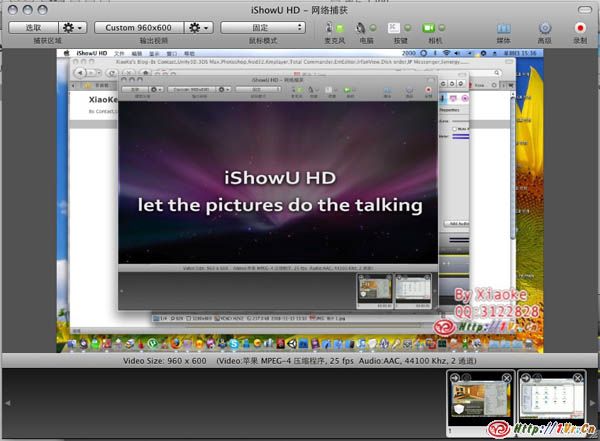
很强大的录屏工具,短短的试用后就让我喜欢上了,预置了很多配置好的选项,可以轻松录制符合你所需环境的屏幕视频,一般为Mov格式.可以添加水印,可以截取摄像头视频,可以跟踪鼠标录制等等,保存文件也很速度,强烈推荐.录视频教程可有得玩喽.最重要的这是中文版哦.

下载地址:http://www.rayfile.com/zh-cn/files/85a23630-9273-11dd-b968-0014221b798a/
破解方法:运行软件,直接输入任意注册名及序列号,即可完成注册.

录屏软件ScreenFlow 1.1.3 for Mac下载

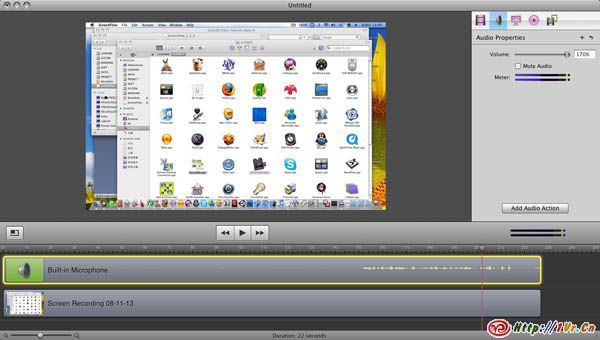
挺小巧的一个录屏软件,录制完毕后带有编辑器进行后期编辑,但是导出视频格式略显缓慢.

软件介绍:
ScreenFlow is a brand new application for creating amazing screen recordings on your Mac. Using a unique new screen capture system, powerful enough to capture the contents of your entire desktop at the same time as your video camera, microphone and computer’s audio, it’s simple to create beautiful screencasts. When resizing high resolution screen content into a QuickTime movie, ScreenFlow uses custom GPU algorithms to give your finished movie the best possible quality. You’ll find even small text suddenly becomes legible for your viewers. ScreenFlow was designed for Mac OS X Leopard. It makes extensive use the best of Mac OS X technologies: Core Animation, QuickLook, Spotlight, QTKit, Quartz Composer, OpenGL, Core Data and many others.
What’s new in this version:
Worked around an issue introduced by the QuickTime 7.5 update that caused QuickTime based media to not play back correctly.

下载地址:http://rs275.rapidshare.com/files/122333208/ScreenFlow_1_1_3_crack.dmg
打开镜像后,用破解补丁给程序打补丁即可.

光棍节的产物-材质校正工具 V1.0

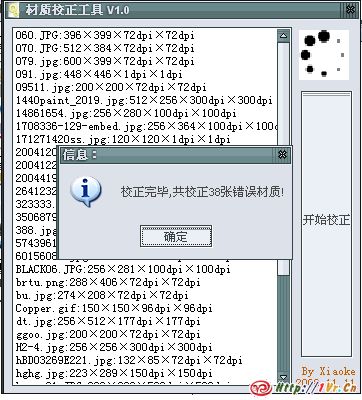
这几天处理一个室内的模型,要导入到Unity3D中,模型是N久以前朋友做的,材质尺寸有些问题,不是2的幂次,分辨率也不都是72.手工改了几张后有点郁闷了,得找到有问题的贴图,然后修改,保存.麻烦.加之最近貌似心情郁闷,干脆写个工具处理吧,编程的时候心无杂念,很H的…

支持常见的贴图格式(DDS除外),自动剔除指定目录下所有非材质文件,并校正所有贴图尺寸到标准尺寸,校正所有贴图分辨率为72DPI,校正及剔除前进行文件备份,确保万无一失.

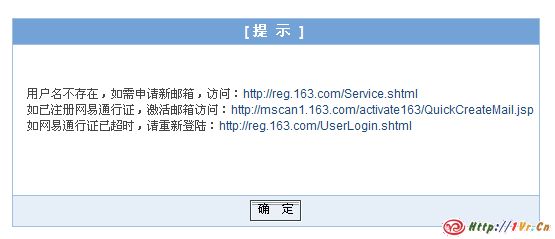
好多个网友都问网易邮箱是不是上不去了,我试了试,果然啊.可以登陆,但是登录后就提示帐户不存在了.不会让人给XX了吧?

POP都收不下来信了好像.这两天雾气昭昭的.好像下雪.突然想看下雪了,想看东北的鹅毛大雪.

Iphone SDK中心也会暂时无法访问的..